
Features
What it does
Action Stations follows the HSEEP pattern for a discussion-based exercise: objectives first, then a timed MSEL, injects that force decisions, and a hot wash. A language model writes the first draft. You read it, fix it and decide what reaches the room.
Documents
- Imports PDF, Word, PowerPoint, Excel, Markdown, plain text, HTML and images. Scanned pages go through OCR.
- Search keeps the headings, so a citation reads like “TIRP §13.6” and points at the section a player would open.
- Facility facts: the gates, rooms, stations, equipment, hostnames and phone numbers your documents mention, gathered into one list you can edit. Scenarios use only names on that list, and the checks flag any that aren’t.
- Import and search work with no model configured, using a built-in offline embedder.
Generating the exercise
- Start from your own brief, or ask for scenario ideas based on your plans.
- The exercise is written in stages: overview, objectives and roles, MSEL phases, controller handbook, rubric, player briefing and hot wash. You can watch each one as it runs.
- A critique pass and MSEL checks look for problems: events out of order, a role that never gets an inject, no decision points, citations to sections that don’t exist, an inject that relies on something players couldn’t know yet.
- Re-run one stage with a different model or prompt and keep the rest, or repair a finished scenario in place.
- Long jobs run in the background. You can move around the app while they run, and pick them up again after a restart.
Injects
- More than 50 inject types, including social posts, emails, helpdesk tickets, system logs, SIEM alerts, SCADA and HMI screens, status boards, news articles and chyrons, press releases, radio and phone calls, ICS-201 and ICS-203 prefills, and STARTEX, ENDEX and time-jump cards.
- Anything with text on it is rendered from an HTML template, so every word is exact and readable. Image generation is used only for photographs of scenes.
- Media is optional: scene photos and short video through ComfyUI, voice lines through a local text-to-speech server or your operating system’s built-in voice.
- Edit an inject’s fields with a live preview, lock it so nothing can change it until you take the lock off, keep earlier versions, or save it to a library to use again.
Editing
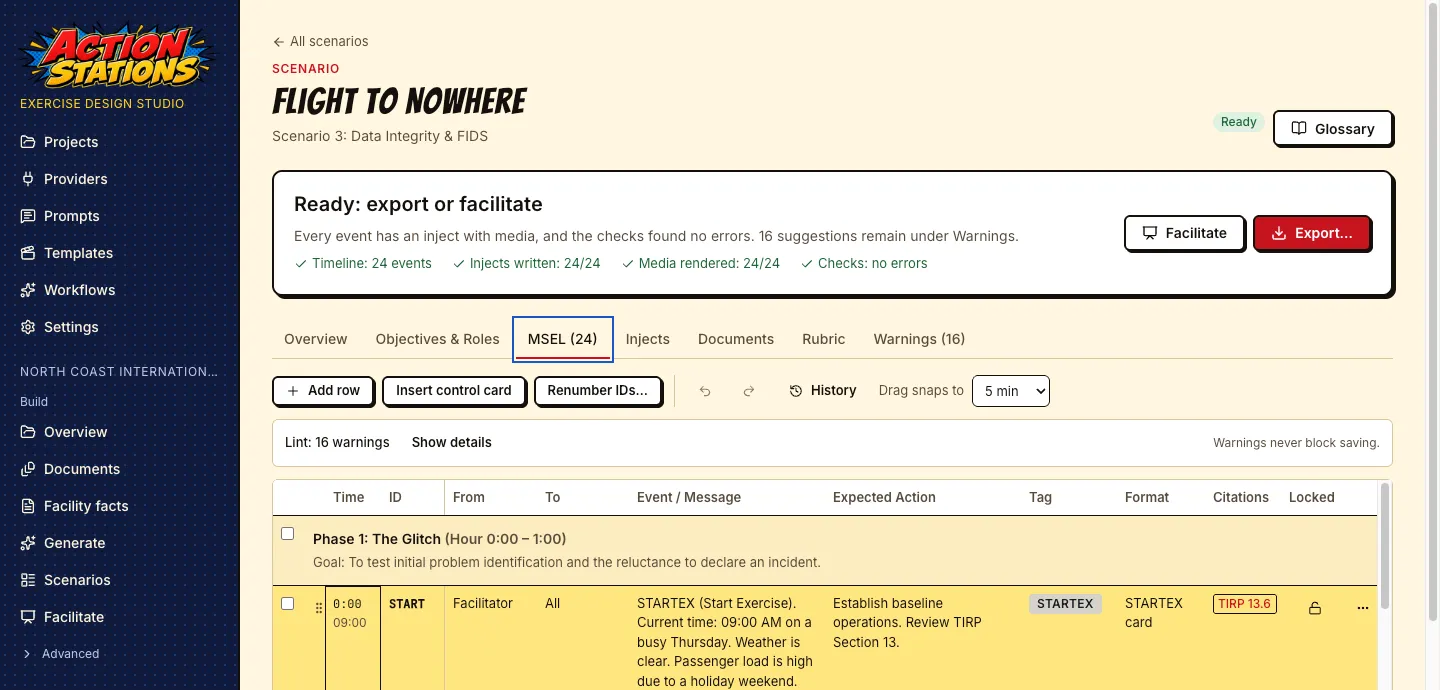
- An MSEL grid with phase headers, inline editing, drag to retime, shifting the times of selected rows at once, control cards and undo.
- Document editors for the overview, handbook, briefing, rubric and hot wash.
- Warnings in plain language, each linking to the row or inject it is about. Warnings never stop you saving.
- A project is a folder of JSON, Markdown and media you can back up, diff and keep in version control.
Export and facilitation
- PDFs of the MSEL, the master inject deck, the controller and evaluator handbook, the player briefing packet with blank ICS forms, and a combined exercise plan.
- Media files named by scenario and inject, scenario.json and scenario.md, and Word copies of the handbook and briefing.
- A ZIP for distribution, with separate folders for facilitators and players.
- Facilitator mode: an exercise clock, time jumps, a Deliver button for each inject, media shown full screen on a second display, and hot wash notes saved with the project.
Teaching
- The app grew out of tabletop exercises written for CSAAP, the Cybersecurity for Airports course. Course material imports like any other document, so a scenario can cite the course next to the plans.
- Print player packets with blank ICS forms, run the exercise in class from facilitator mode, and keep the hot wash notes with the project for the debrief.
- Free for schools, colleges and universities: teaching, coursework, research, student clubs and competitions, on lab and student computers (see License & commercial use).
Beyond airports
- Domain profiles for airports, transit, water and wastewater utilities, dams, energy utilities, healthcare, campuses, stadiums and venues, ports, municipal government, industrial plants and unmanned systems, plus a generic profile for anything else.
- A profile sets the vocabulary, the kinds of facility facts to check, the roles and the threat families.
- Three example projects ship with the app: a fictional international airport, a city water department and a drone operator.
Models and providers
Use the models you already run
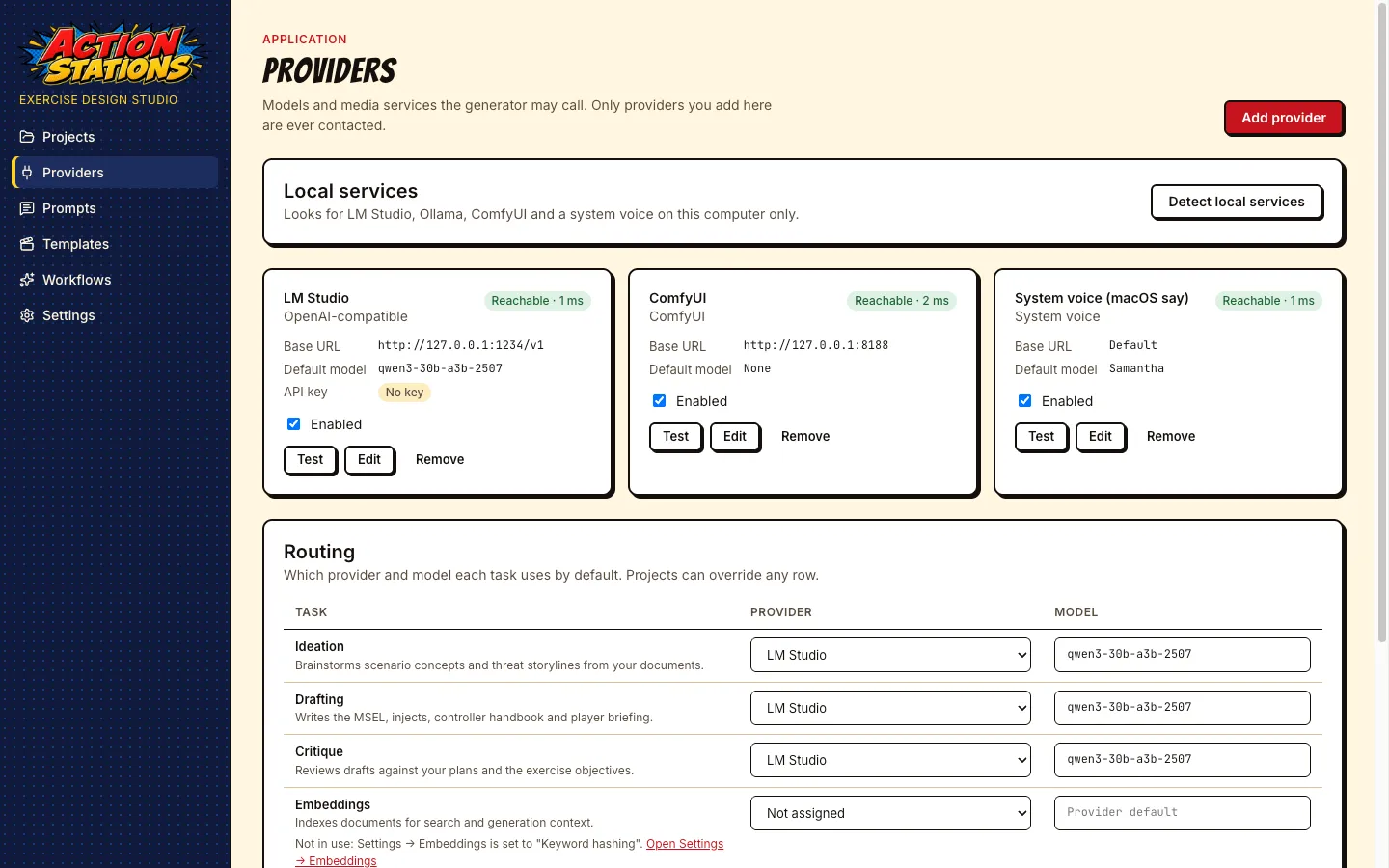
Each task can go to a different provider: ideas, drafting, critique, search embeddings, images, video and voice. A project can override any of them, so a sensitive project can stay on local models while others use a hosted one.
- Local text models: LM Studio, Ollama, or any OpenAI-compatible server.
- Hosted text model: Anthropic’s Claude, with your own API key.
- Images and video: ComfyUI with workflows you can import and bind.
- Voice: a local OpenAI-compatible speech server, or the system voice on macOS, Windows and Linux.
Detect local services finds the local services running on your computer and adds them with one click. The app contacts no provider until you add it.
MSEL editor
Free for your organization’s internal use and for education. Running exercises for other organizations needs a commercial license.